__MK__tabaqat · StrataReal Estate
Land Bank & Acquisition Screening

Is there anything here
that would kill the deal?

Draw the outline of a site you are looking at. The app checks it against official public maps and registers. Each finding is sorted into one of four kinds: it rules the deal out, it can be cleared, you can design around it, or the public record cannot answer it.

California example · 11 checks Official public data · read-only · runs in a web browser
© 2026 Tabaqat · Built on Strata. A first desktop screen. It comes before a Phase I environmental site assessment and does not replace it.
The decision it helps with

Option it, walk away, or pay for a Phase I.

This is the first yes or no on a piece of land, before it becomes a serious candidate. It is built for acquisitions teams at developers, homebuilders, industrial and energy developers, and funds.

You draw the site on the map instead of typing an address. Raw land often has no address, and sometimes no parcel record at all. Drawing also lets the app measure how much of the site each constraint actually covers (see the example on slide 6).

For land teams, land bankers and acquisitions desks
4kinds of finding, including one most tools never show: cannot be known from public records

The industry calls this stage fatal flaw analysis. It comes before feasibility studies and permitting.

Today it is usually bought from a consultant, per site, as a written report.

The problem

Today's tools either leave the judgement to you, or answer a different question.

Data platforms show the maps, not the answer

LightBox, Regrid and Land id offer parcels, ownership, zoning and many other map layers. They show where a constraint is. They do not tell you whether it kills the deal, or what they did not check.

Compliance tools answer a different question

Symbium checks what can be built on an existing parcel with an address, for permitting. Esri's ArcGIS Urban scores and ranks parcels for planners. A deal-breaker cannot be shown as a low score.

Land teams need a quick first screen they can run themselves, on land with no address. It should say clearly what it found, and what it could not check.

Full environmental records reports, such as an EDR Radius Map, search over 2,000 databases and support a Phase I. This app does not try to replace them. For contamination it uses the state's Cortese List, which California developers must check anyway before a planning application.

How findings are sorted

Four kinds of finding.

FatalA mapped constraint covers the site and the rules forbid the use.
ClearableCan be removed. The app names the document needed, who issues it and how long it takes.
PresentReal, but it affects the site layout, not whether you buy.
UnknowableNo public source answers this question here. Shown with a dashed outline.

Costs are described, not guessed

No public source prices a geologic report, a clean-up, a rezoning or ending a Williamson Act contract (a farmland tax agreement). So the app tells you what is required, for example a geologic report approved by the State Geologist. It does not invent a dollar figure.

Utilities are always marked Unknowable

No public California source says whether a site is connected to utilities, or whether there is spare capacity. So this check shows as Unknowable on every screen, even when nothing else is found. Leaving it out would suggest services are available.

Each kind has a label as well as a colour, and Unknowable is dashed, so the screen still reads in black-and-white print and for colour-blind readers.

How the app works

Draw the site. The checks run on their own.
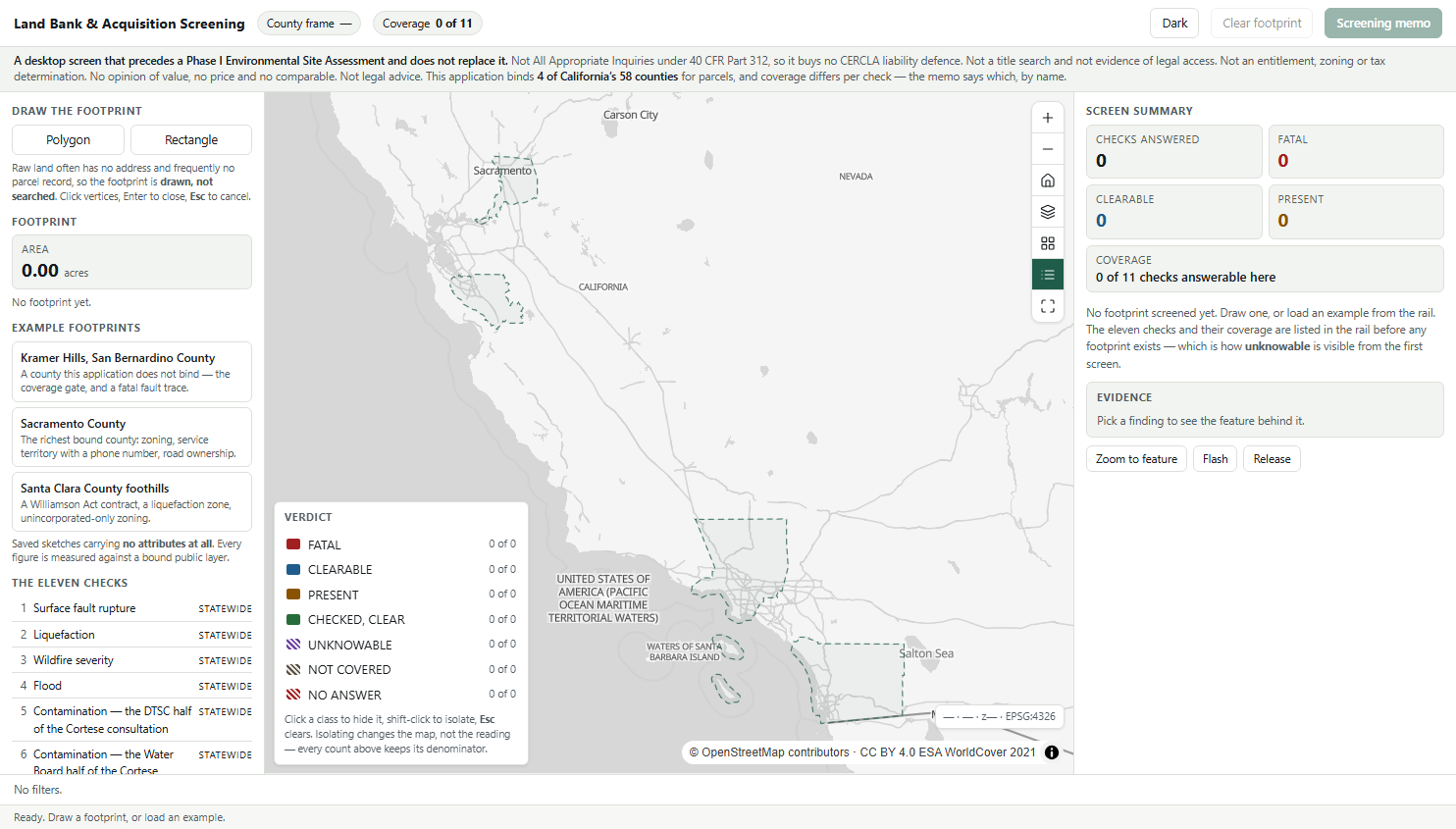
The app when it opens: drawing tools and the list of eleven checks on the left, the four counties with full parcel data outlined on the map, the legend at bottom left, and the screen summary on the right.
Screenshot of the working app, September 2026.
  • Draw the site as a shape or a rectangle. No address is needed.
  • The 11 checks are listed before you start, each showing whether it can be answered in that county.
  • A notice stays on screen: this is not a Phase I, not a title search and not a valuation.
  • The map outlines the four counties where full parcel data is loaded.
  • Click the legend to hide or show each kind of finding.
A worked example

One point says no. The measurement says build here.

Most tools test a single point at the address. If that point falls inside a hazard zone, the whole site is flagged. Because you draw the site, this app can measure how much of it is affected. That share often decides whether a constraint kills the deal or just shapes the layout.

Here is a real 225-acre site at Kramer Hills that crosses an Alquist-Priolo Earthquake Fault Zone (a state-mapped zone around active faults, where buildings for people need a geologic study). The single-point test says the site is in the zone. The measurement shows 78% of the site is outside it.

The point test says call a consultant.
The measurement shows where the buildings can go.

Kramer Hills · state earthquake fault zone
Site drawn225.46 ac
Inside the fault zone49.62 ac
Outside it175.84 ac
Share inside22.0 %
Single-point testIn the zone

Measured against the California Geological Survey's official fault zone map.

What the screen could answer

How many checks this land can actually answer.

Next to the findings, the app shows how many of the 11 checks it could answer for this site. It is not a score. Each check it could not answer is listed by name, with the reason: either that county's data is not loaded, or no public source exists.

Most data products present themselves as complete and do not show this.

For a land team, the list of what the desktop screen could not settle is the starting scope for the Phase I.

4 of 11checks could be answered for a site in San Bernardino County, where full parcel data is not loaded. The app shows this next to the findings.
fatal present checked, clear unknowable not covered

The same checks on a site in Sacramento County answer 9 of 11. How much can be answered depends on where the land is.

Why this matters

"Nothing found" can mean three different things.
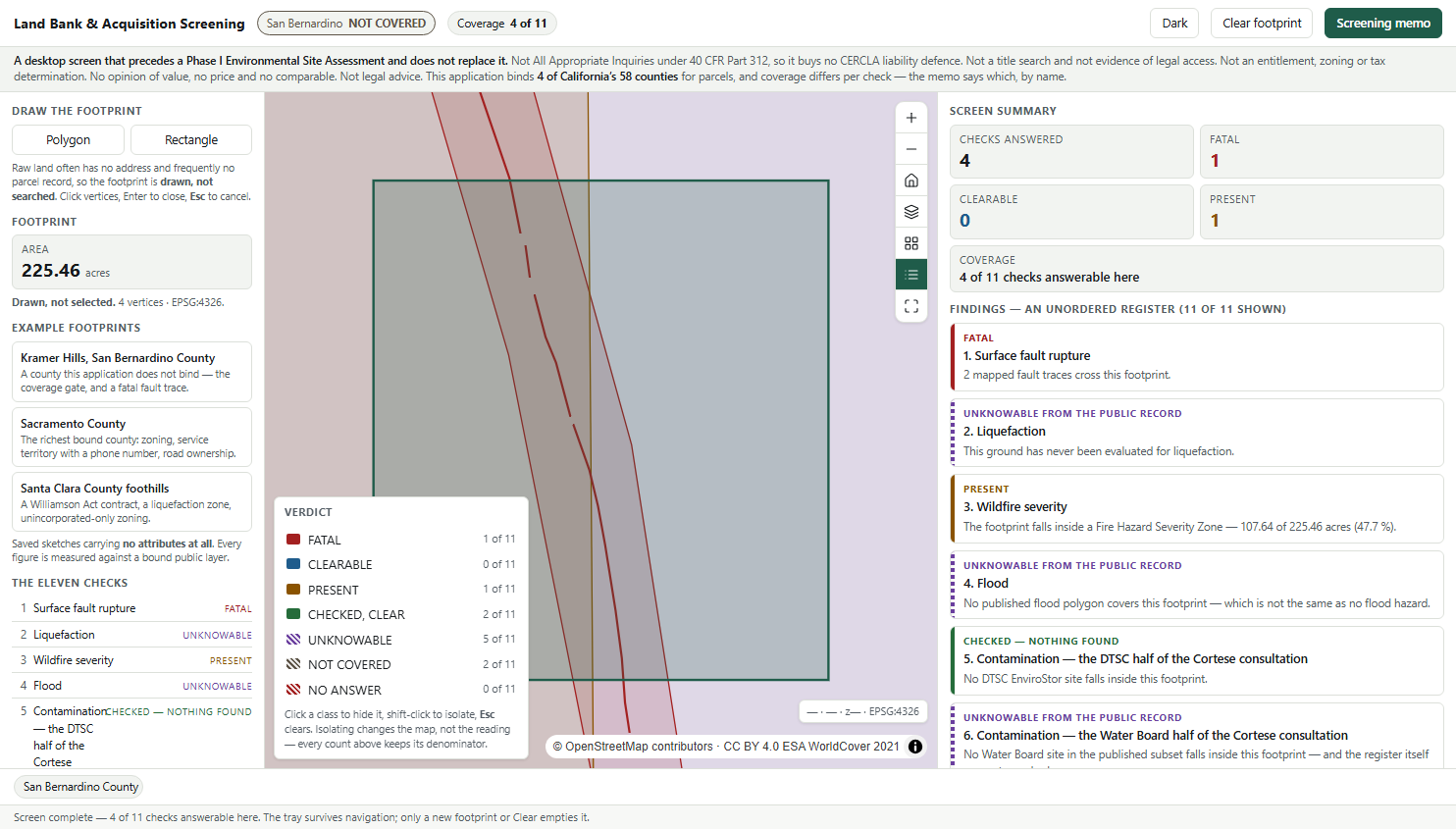
The app screening a site in San Bernardino County: the header reads NOT COVERED, 4 of 11 checks answered, the fault check is Fatal, liquefaction is Unknowable because the state has not mapped this ground, and zoning and utilities show NOT COVERED with the county named.
A 225-acre site in San Bernardino County. Zoning and utilities show NOT COVERED and name the county. They never show as no constraint found.

For one site, six map layers returned nothing. That empty result meant three different things.

  • Truly clear. No fire hazard severity zone covers this land.
  • Never studied. The state has not mapped liquefaction risk (ground turning soft in an earthquake) here. Shown as Unknowable.
  • No data for this county. Parcel data is not loaded for this county. Shown as Not covered.

The app works out which county the site is in first. Checks with no data for that county are marked Not covered.

Showing all six as "clear" would be a serious error. It would turn a data gap into an all-clear on land someone is about to option.

Where the data comes from

Each finding is tied to a specific rule.

RuleWhat it means for the sitePossible result
Alquist-Priolo Earthquake Fault Zoning Act
Map: California Geological Survey
No buildings for people across an active fault. Inside the mapped zone, a geologic report approved by the State Geologist is required.Fatal · Clearable
Cortese List (contaminated sites)
Map: DTSC EnviroStor, 15,182 sites
Developers must check these state lists and sign a statement before a planning application is accepted.Fatal · Clearable · Present
Williamson Act contractA rolling ten-year contract that keeps land in farming. It renews each year unless a notice of non-renewal is filed.Clearable, over years
Seismic Hazards Mapping Act
Map: California Geological Survey
Zones where the ground may liquefy in an earthquake. Applies only where the state has mapped.Present · Unknowable
EPA All Appropriate InquiriesThe federal standard behind a Phase I. This screen does not meet it and gives no legal protection.None. This is the app's limit.

Limit on contamination data. Four state agencies compile the Cortese List. Only one (DTSC EnviroStor) publishes a full map service. A second publishes part of its list, and two publish no map data. The app shows this gap next to the check and in the memo.

The screening memo

A printed memo, and why you can trust the numbers.
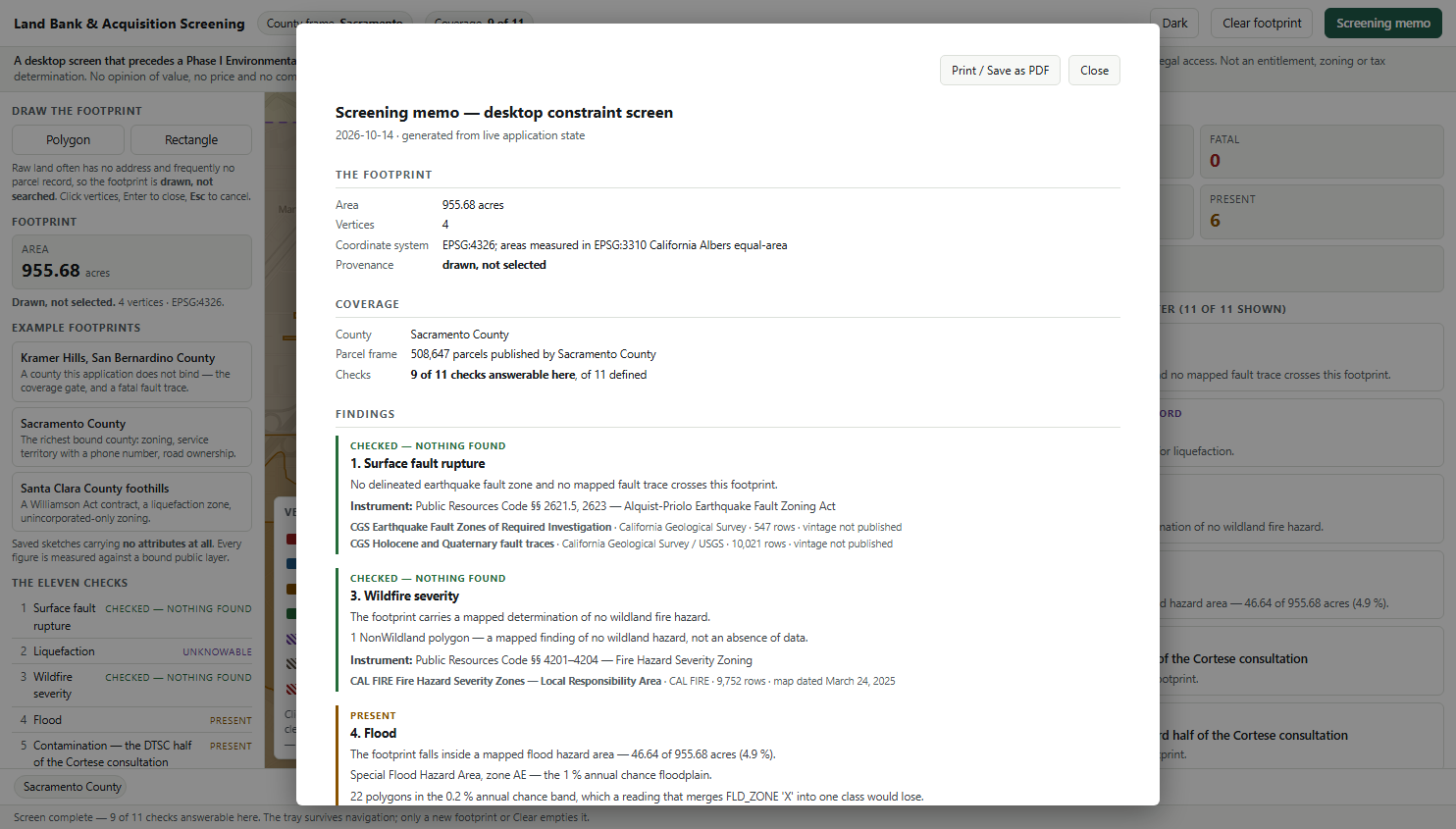
The screening memo: the site outline with its acreage, a coverage section naming the county, each finding with its rule, source and data date, and a list of what was not checked and why.
Printed straight from the web browser. Nothing to install.
  • Draw, check, review, print. All 11 checks run at once and the findings collect in a list you can print as a memo.
  • Every finding shows its rule, source and data date. If a source publishes no date, the memo says so.
  • All data comes from official public sources, read directly and never edited.
  • If a source fails to respond, the app shows an error. A failed lookup is never shown as clear.
  • No score or ranking. A deal-breaker and a layout issue are not added together.
  • Owner names and personal details are never shown.
Limits

What this app does not do.

  • It is not a Phase I environmental site assessment. It does not meet the federal All Appropriate Inquiries standard and gives no legal liability protection. It comes before a Phase I.
  • It is not a title search. It does not prove legal access. Road frontage is read from the map only, and easements are not published as public data.
  • No valuation, prices or comparables. That is the valuer's job.
  • Coverage varies by check. Parcel data covers 4 of California's 58 counties. Zoning covers only land outside city limits, in the two counties that publish it.
  • Wetlands are not checked. The official wetlands map is published as an image, so it cannot measure acres.
  • Nothing is made up. Where there is no source, the check stays empty and says why.

These limits are shown in the app and printed on every memo.

For your own land

Screen sites
in your own market.

California is the example. The checks, the data sources and the rules are settings, so the app can be set up for another country or region. Tell us which public maps you rely on and which rules apply, and we will set it up for your land.

What changes: the parcel data, the constraint maps, the areas covered and the rules cited. What stays: the four kinds of finding, the coverage count and the memo.

tabaqat.net → Solutions → Real Estate info@tabaqat.net
© 2026 Tabaqat · Built on Strata. California example, checked September 2026. A first desktop screen that comes before a Phase I and does not replace it. Not a title search, not a planning or tax ruling, not a valuation, not legal advice.
1 / 12